The platform

One app.
Switch on what you need.

Sales, Service, Marketing and Workforce share one customer list and one set of rules. Your company gets its own workspace on its own domain.

Your own domain Roles per person Custom fields on everything Full change history Light and dark themes
Modules

What is inside

₹

Sales

Quote it, track it, invoice it.

QuotationsStandard quotesSales ordersPipelineInvoicesPurchase orders
◴

Service

Every job on one path.

CasesAMC contractsWork ordersDispatchTechnicians
📣

Marketing

Reach customers, then see who is ready.

EmailAudiencesIntelligence
▧

Master data

One list of everything you deal with.

AccountsContactsAssetsProductsSuppliersInventoryEmployeesPartners
◷

Workforce

Attendance, leave, projects, billing.

Live boardRosterCorrectionsLeave & holidaysProjectsTime summary
✧

AI automation

Agents that watch and suggest. A person approves.

Tender WatchAttendance Anomalies

Step by step guide →

◫

Analytics & admin

See the numbers, control the workspace.

DashboardAnalyticsTalk to dataData WorkbenchAudit & users
◫

Tenders & projects

Price the client's BOQ. Win it. Run it.

Bill of quantitiesEstimatesRFQsBidsContract projects
⇄

Integrations

Connect the systems you already run.

Dynamics 365SAP S/4HANAePROMISGmailShared inboxWebhooks
◉

People & access

Who can sign in, and what they can open.

RolesLock and resetValidity datesChange history
Analytics & Talk to data

Ask in English. Get the chart.

"Quotes by status this month." "Billable amount by account last quarter." Talk to data picks the object, the filter and the grouping, runs it on live data, and shows what it measured.

  • Numbers come from the system, never from the AI
  • Each person sees only what they are allowed to
  • Save a report; it lands on the dashboard
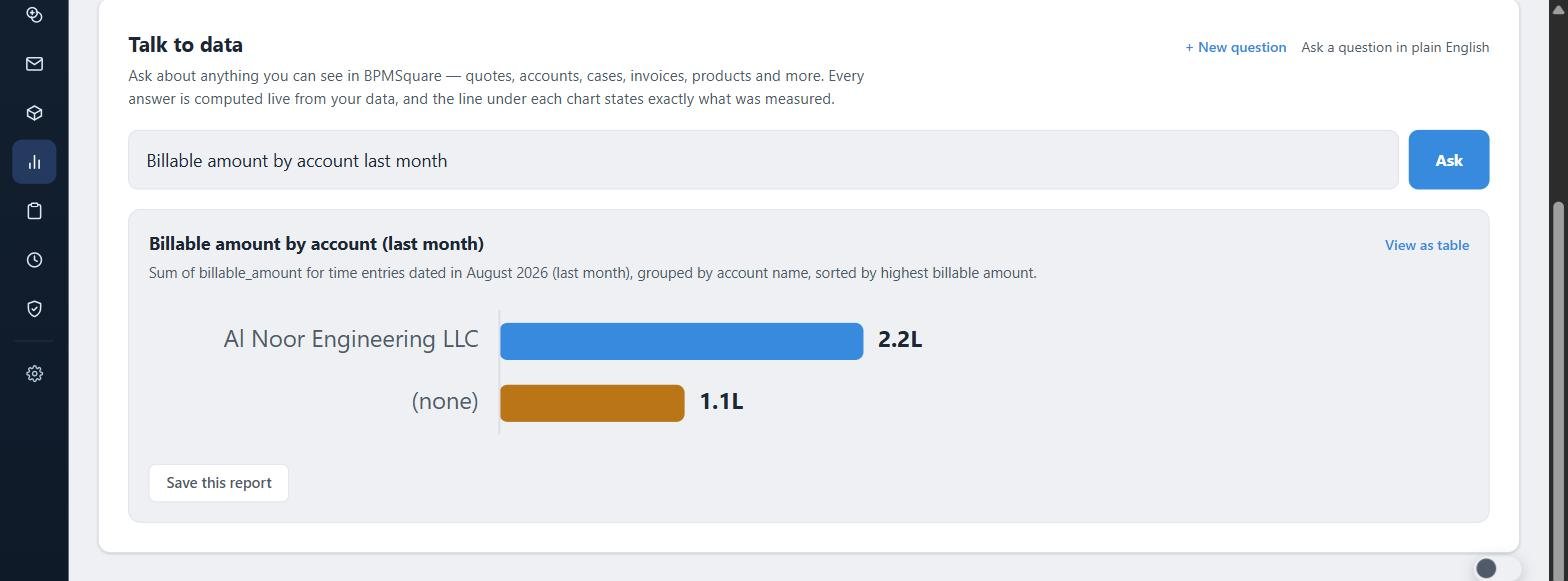
Talk to data

A dashboard per person

Tiles for every module. Each user arranges their own.
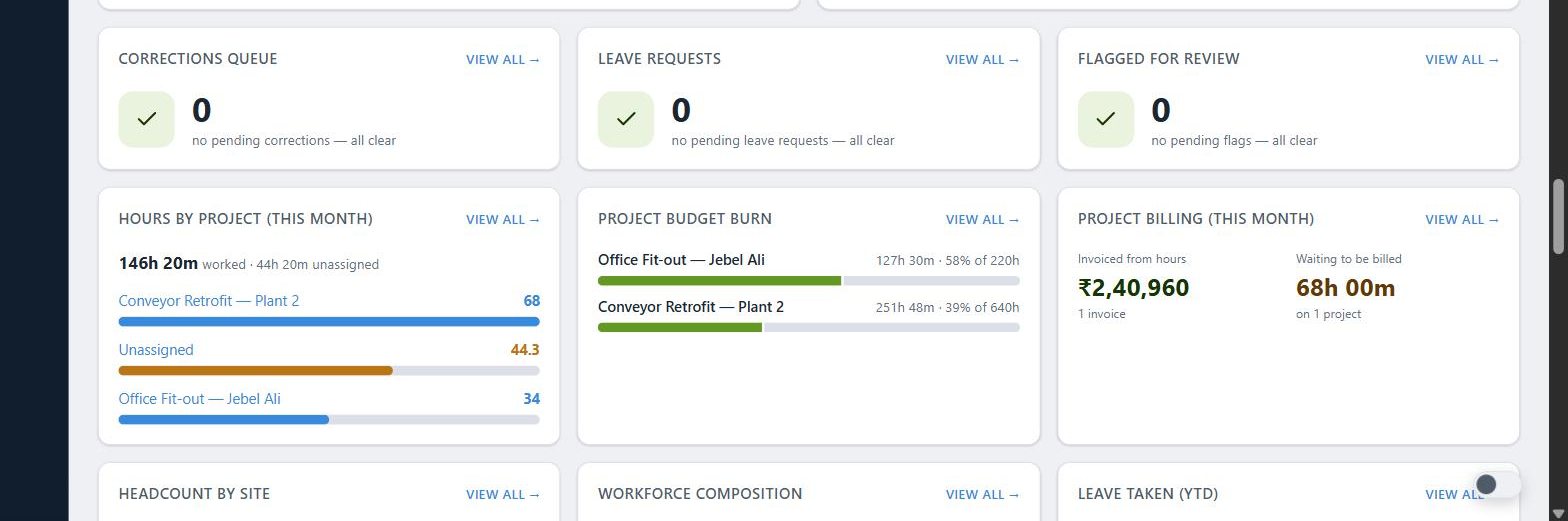
Dashboard tiles
API & integrations

Your records, on an API.

Read the API documentation → Read the Solution guide →

SurfaceWhat it doesUse it for
REST API v1Accounts, cases, quotations, standard quotes, sales orders, invoices, products, inventory, purchase orders, deals, projects, project hours and more. Quotations can be written; the rest is read-only. OpenAPI included.ERP and accounting sync
Scoped API keysOne key per integration, read or write, limited to named objects, with an expiry. Staff data, supplier prices and estimates only when named.Least privilege
Webhooks & change feedEvery create, update and delete, as a pull feed or as signed push in scheduled batches.Keep other systems in step
Ask endpointTalk to data over HTTP. Question in, rows out.Reports from a script or chat tool
MCP server38 tools that let an AI assistant read the workspace with the permissions of its key.Claude and other AI clients
ConnectorsDynamics 365, SAP S/4HANA, ePROMIS, Gmail and a mail server (SMTP / IMAP). Slack and Google Calendar can be connected and tested.Connect the systems you already run
Integration middlewareLinks per object, field mapping, a message monitor and resync for your ERP.ERP sync you can watch
Data WorkbenchImport, export and bulk update from spreadsheets. An update always matches on the record's own ID.Migration and bulk changes
Your data

Your workspace is yours.

One workspace per company, on its own domain.
Data separated at the database level. Every row is tied to your workspace.
Personal data encrypted at rest. Phones, emails, tax ids.
Roles decide who sees what. Supervisors see their sites. Employees see themselves.
Change history on everything. Who, what, when, before and after.
Test workspaces cannot email real customers. Ever.
Custom fields and layouts without touching code.
Your customisations stay yours. They never change another company's product.
People and access in one place. An admin adds a person, sets a role, and every change is logged. A new login must choose its own password at first sign-in.
Secrets are shown once. Signing secrets and API keys cannot be read back after you copy them.

See it on a live workspace.

Twenty minutes. Your use case. No slides.