Tenders & contract projects

Win the tender.
Then run the project.

Start from the client's Excel bill of quantities. Price it from your estimates and supplier quotes, submit a bid you can compare version by version, and when you win, carry the numbers straight into a project budget and buy-out.

Client BOQ in Excel Bid / no-bid approval Supplier RFQs and award Versioned bids Project budget and buy-out
The chain

From the invitation to the site, in one place.

1

Decide

Propose a bid or no-bid. A named approver signs it off.

2

Load the BOQ

Upload the client's Excel. Rows keep the client's order.

3

Price

From estimates, rates and supplier quotes. Markup on cost.

4

Bid

Submit a numbered version. Revise it. Compare any two.

5

Run it

The award becomes a contract project with a budget and buy-out.

Bid decision and bill of quantities

Bid with your eyes open.

Every tender starts with a recorded decision, and the bill of quantities arrives as the client sent it.

  • Start a tender from an incoming email: the shared inbox turns it into a tender deal, and you choose which senders and subject words are taken in
  • A bid or no-bid proposal that an approver signs off, with the reason kept
  • Upload the client's Excel in its own layout: Item # is the item number, Narration the line name, Description the details, and the other columns are kept. Up to 2,000 lines and 15 MB, with a template to download. A revised upload keeps the work you have done
  • Match each row to your product catalogue with ranked suggestions
Stage from received to awarded.
Bid decision with the approver and the reason.
Bid end date, counted down in days.
Bid guarantee: requested, submitted, valid to.
Open work: unanswered questions and overdue steps.
Costing

Price every row from a source you can name.

Rows are priced from an estimate, a rate or a supplier's quote. The screen counts what is priced, what still needs a cost, which RFQs are out and which replies are in.

  • Work a cost out from an estimate template: choose the kind of work, enter the inputs, and the price and bill of materials follow
  • Send RFQs to suppliers by email, each with a no-login reply link and an Excel reply sheet
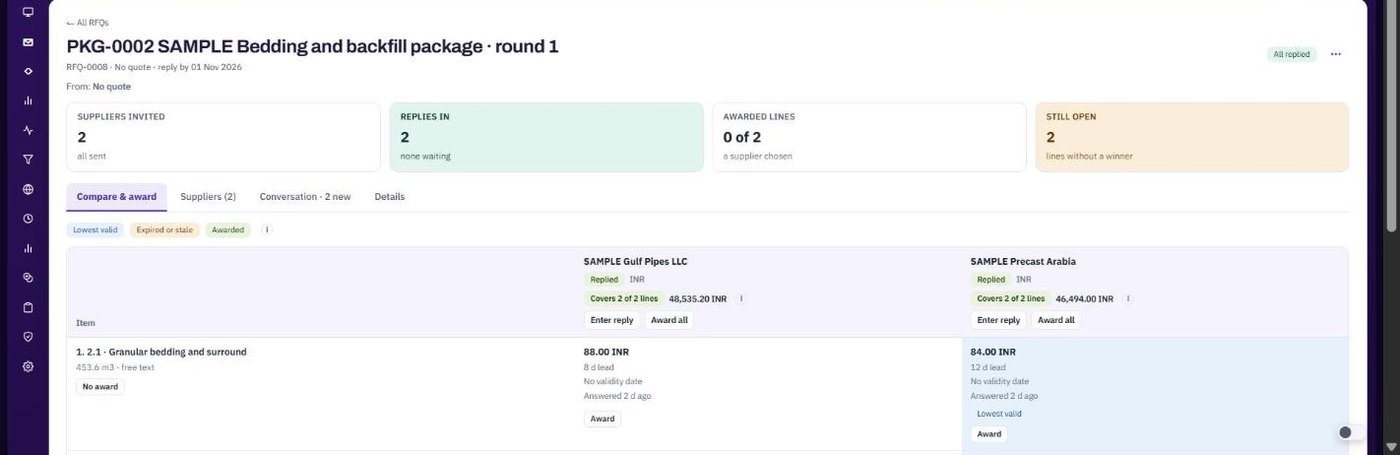
  • Compare replies side by side and award the lowest valid price
  • Prices older than your validity window are flagged before they reach a bid
app.bpmsquare.com
Supplier replies compared side by side

Compare and award: each supplier's reply side by side, the lowest valid price marked.

The bid

Submit a version. Change it. Compare.

Each submission is a numbered version that never changes afterwards. Revise the bid and the next one becomes the next version. Submitting saves the version in BPMSquare; you send the priced Excel to the client yourself.

  • Compare any two versions line by line
  • The priced bill of quantities goes back in the client's own layout
Lines without a price are counted and listed.
Prices older than your window are flagged.
No approved decision is called out.
Bid guarantee not yet submitted is called out.
After the award

The win becomes a project, with a budget.

When the tender is awarded, create the contract project from it. The budget starts from what you priced, and buy-out follows the same RFQ and award routine.

  • Budget by resource and cost type, with revisions and a baseline you approve
  • Buy-out packages that send RFQs, compare replies and commit the award against the budget
  • Variations, a billing schedule and invoicing from the same project
  • An Excel hand-over of the budget and of each awarded package, for your purchasing system
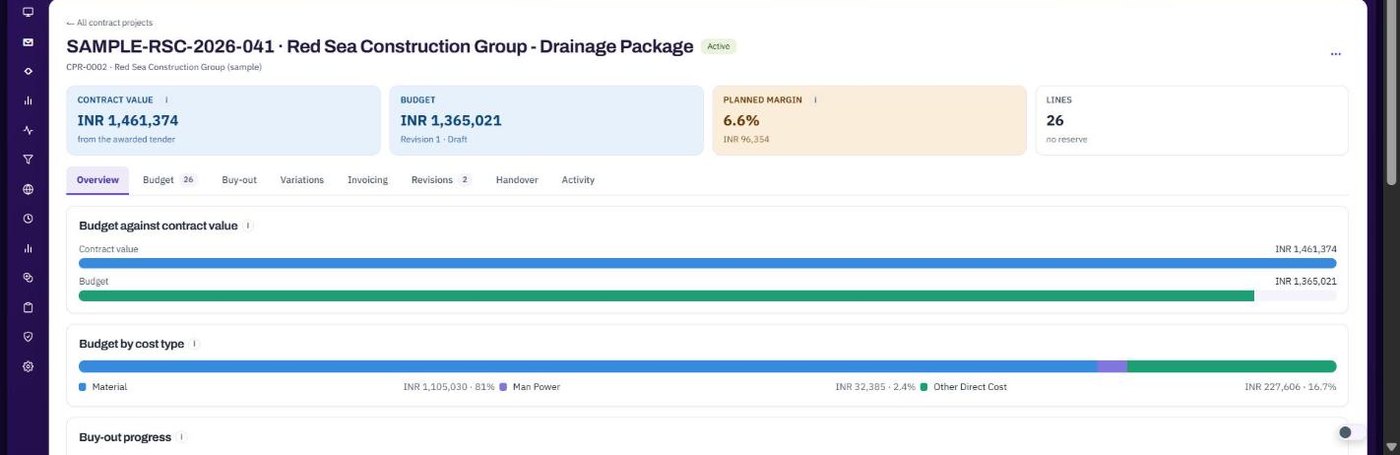
  • Planned margin, committed cost and what still needs a decision, at a glance
app.bpmsquare.com
A contract project with contract value, budget and planned margin

A contract project: contract value, budget, planned margin and buy-out progress.

The team

Everyone on the tender sees the same thing.

A team room per tender. Questions, decisions, calls and files in one thread.
Competitors recorded. Who you expect to bid, who is cheaper and who won.
Tender blocks on the dashboard. What closes soon and what needs your action.
Reminders before the bid ends. Nobody finds out on the last day.
Approval by named people. You cannot approve your own proposal unless your company allows it.
Full change history. Who changed what and when, on every tender.
Readiness

Live today. Next.

We would rather you read this here than find out later.

CapabilityWhy it mattersStatus
Bid / no-bid decision with approvalA recorded reason and a named approverLive
Client BOQ upload, revised upload, product matchingStart from the client's own fileLive
Estimates, supplier RFQs, compare and awardEvery price has a sourceLive
Versioned bids and the priced BOQ back outRevise safely and compareLive
Team room, competitors, reminders, dashboard blocksOne shared pictureLive
Contract project: budget, revisions, buy-out, variations, invoicingRun what you wonLive
Tender from an incoming email, with sender and subject filtersThe enquiry becomes a tender without retypingLive
Excel hand-over of the project budget and awarded packagesGive purchasing a file they can loadLive
Sending the project and awarded packages straight to ePROMISNo re-keying into the project systemNext

Bring a tender. Leave with a priced bid.

Twenty minutes on a live workspace. Your BOQ, your suppliers.